Log inRegister

File type (un)association
Associate any unknown file type with Notepad++
Log files usually have the date of the log file as extension. You want to open them with Notepad++, but not by right-clicking the file and choosing Edit with Notepad++, but simply by double-clicking the file. Is that possible? Yes: In the registry, go to:- HKEY_CLASSES_ROOT\Unknown\shell
- add a key notepad
- under notepad, add a key command
- change the command key's (Default) string value in:
- for 32-bit: "C:\Program Files (x86)\Notepad++\notepad++.exe" "%1"
- for 64-bit: "C:\Program Files\Notepad++\notepad++.exe" "%1"
- now change the HKEY_CLASSES_ROOT\Unknown\shell key's (Default) string value in notepad (default is: openas)
Update 19/07/2025
At home, this trick still works. At the office, however, the (Default) value is always (once a day?, at logon?) overwritten by the initial default value openas, and, what's worse, it cannot bet changed: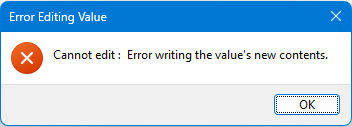 However, you can delete the (Default) value, and then files with an unkown file extension are again opened in Notepad++. I suppose that is because that is the only subkey under shell that has a (Default) value itself, apart from the openas one...
I haven't scheduled it yet, but it is possible to delete it through an elevated command prompt, with the following command:
However, you can delete the (Default) value, and then files with an unkown file extension are again opened in Notepad++. I suppose that is because that is the only subkey under shell that has a (Default) value itself, apart from the openas one...
I haven't scheduled it yet, but it is possible to delete it through an elevated command prompt, with the following command:
reg delete "HKCR\Unknown\shell" /ve /f/ve = (default) value
/f = force Auditing aangezet:
- in the registry itself, rightclick the 'shell' key and choose Permissions
- then click on the Audit tab and add Everyone to the Auditing entries
(initially, I had only added 'myself', but of course, changes made by an external source aren't audited then...) - secpol.msc (local security policy): Advanced Audit Policies > Object Access: Enable Audit Registry
- then change a value in the registry
- finally, in Event Viewer, go to Windows Logs > Security and filter for Event ID 4657 (modification to registry values)
- a .bat file with the reg delete command
- an accompanying .vbs file that makes the execution of the .bat file invisible/hidden
- a scheduled task that
- runs with highest privileges
- that triggers
- On an event
- Log: Security
- Event ID: 4657
- executes the .vbs file
Unassociate a file type
Once associated to a program, you cannot unassociate a certain file type/extension through the Windows Settings (or Control Panel). It is however possible using the Registry Editor:- open the Registry editor
- backup & delete the key HKEY_CURRENT_USER\Software\Microsoft\Windows\CurrentVersion\Explorer\FileExts\.ext¹
- backup & delete the key HKEY_CLASSES_ROOT\.ext¹
- restart Explorer
tags extension extensions unknown file type types notepad++ any file

 Copyright © by the contributing authors. All material on this collaboration platform is the property of the contributing authors.
 Ideas, requests, problems regarding Foswiki? Send feedback